
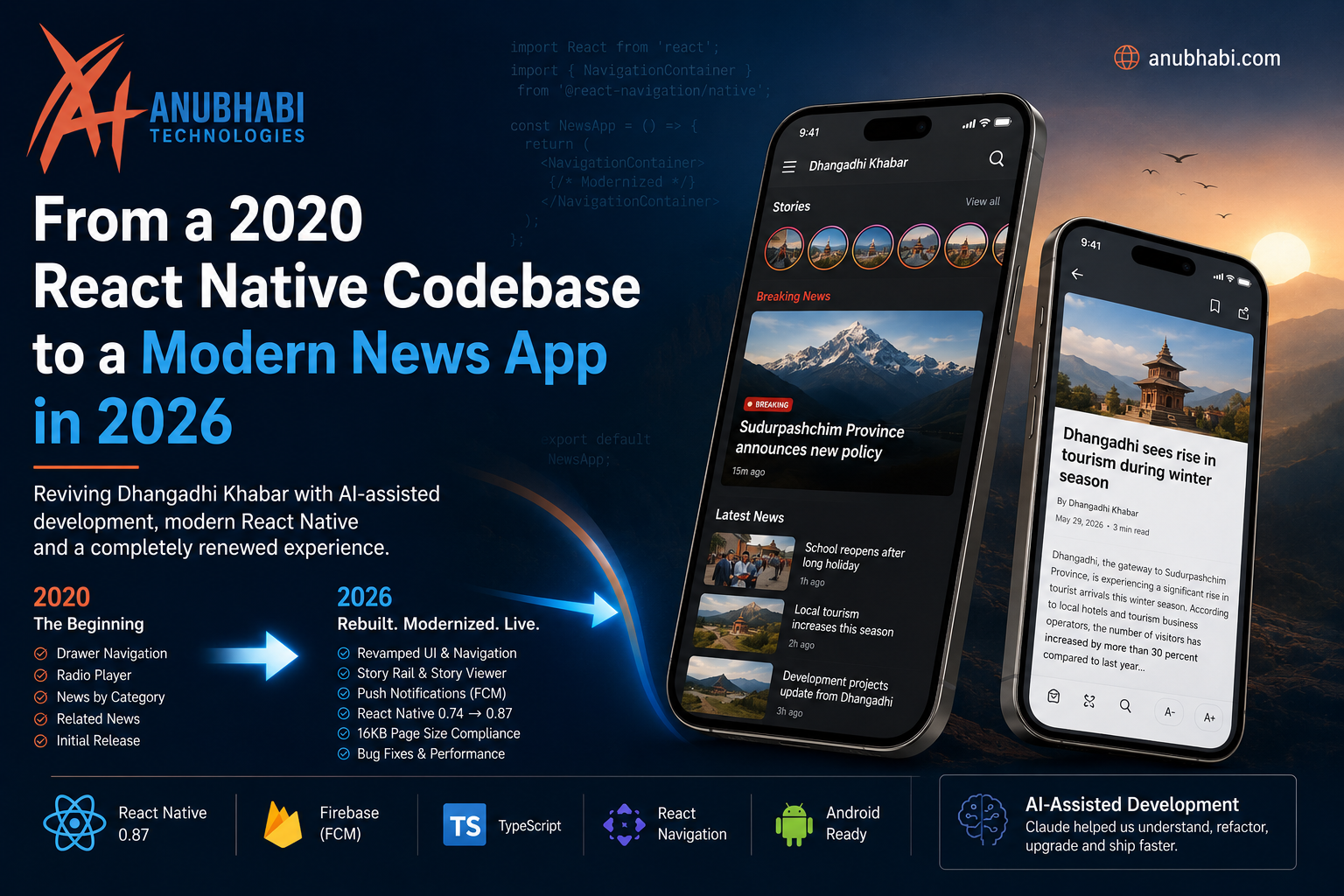
How we revived Dhangadhi Khabar with React Native, modern engineering practices, and AI-assisted development
At Anubhabi Technologies, we have always believed that software doesn't necessarily become obsolete just because it hasn't been touched for a few years.
Sometimes, it simply needs someone willing to open the old codebase again.
Recently, we did exactly that.
We took a React Native news application that was originally developed around 2020, left untouched for years, and brought it back to life in 2026.
Today, that application is once again running in production as Dhangadhi Khabar, available on Google Play.
Get Dhangadhi Khabar on Google Play
The interesting part isn't simply that we updated an old React Native application.
The interesting part is how we did it.
We combined the original codebase, modern React Native, current Android requirements, a cleaner architecture, and AI-assisted development using Claude.
And the result was not a completely new application.
It was an old application that got another life.
It started in 2020
The project repository goes back to February 2020.
The early commits show the application evolving feature by feature: navigation, news categories, tags, related news, radio functionality and other capabilities were gradually added as the application took shape.
At that time, the React Native ecosystem looked very different from what it does today.
The application was built for a different generation of Android devices, libraries and platform requirements.
Eventually, development stopped.
The repository remained there.
The code still existed.
But the application was effectively frozen in time.
And then, six years later, we opened it again.
View the original and modernized source code on GitHub
What happens when you open a six-year-old React Native project?
The first temptation with an old project is to say:
"Let's just build it again from scratch."
Sometimes that is the right decision.
But rebuilding everything also means throwing away years of existing business logic, API integration, UI decisions, domain knowledge and working code.
So we decided to investigate first.
Could the existing application be modernized?
The answer turned out to be yes.
But it wasn't going to be a simple dependency update.
The React Native ecosystem had moved on
The original application was built on an older React Native stack.
By 2026, React Native itself had evolved substantially, along with React, navigation libraries, Firebase integrations, Android build requirements and the broader JavaScript ecosystem.
One of our modernization commits involved upgrading:
React Native 0.74 → React Native 0.87
This wasn't simply about getting a newer version number.
Modern Android and Google Play requirements had introduced new considerations, including 16 KB page-size compatibility.
So the application needed to evolve with the platform.
This is one of the realities of maintaining mobile software:
An application can still "work" while the ecosystem around it continues moving.
We didn't just upgrade dependencies
Modernizing the application wasn't limited to changing versions in package.json.
We also reconsidered the application's structure and user experience.
The current project separates responsibilities into areas such as:
src/
├── api/
├── components/
├── hooks/
├── navigators/
├── screens/
├── storage/
├── theme/
└── utils/
This makes the application easier to understand and gives future development a cleaner foundation.
We also introduced or improved:
- API abstraction
- Reusable components
- Hooks
- Navigation architecture
- Local storage
- Offline-aware data handling
- Pagination and de-duplication
- Light and dark themes
- Article caching
- Push notifications
- Story-based content presentation
The goal wasn't to make the code "new".
The goal was to make it maintainable.
Then came the biggest change: AI-assisted development
This modernization also gave us an opportunity to work differently.
We used Claude extensively during the process.
But we don't think of this as:
"AI built our application."
That would miss the interesting part.
Claude acted more like an additional engineering partner.
We used it to help understand the existing codebase, identify outdated patterns, reason about dependency migrations, implement changes, investigate errors, refactor components and iterate through problems.
The engineer still had to make the decisions.
Which features should remain?
Which should be removed?
What should the new navigation look like?
How should the API layer work?
What behavior should be preserved?
What should be redesigned?
What should be deleted?
AI was extremely useful for reducing the amount of time required to understand and manipulate a large amount of legacy code.
That distinction matters.
AI didn't eliminate engineering. It accelerated it.
From radio player to story rail
The old application contained functionality that no longer made sense for the current product.
One example was the radio player.
Instead of carrying every historical feature into the new version, we removed functionality that was no longer part of the product direction.
At the same time, we introduced a new story rail and story viewer experience.
The home screen was redesigned.
The sidebar navigation was revamped.
Breaking and latest-news presentation was improved.
The application was gradually transformed from an old news reader into a more modern news experience.
This is an important part of modernization:
You don't have to preserve everything just because it already exists.
Modernization is also an opportunity to decide what the product should become.
Push notifications
News applications depend heavily on timely content.
A reader doesn't necessarily want to open the application every hour just to find out whether something important happened.
So push notifications became an important part of the modernization.
We integrated Firebase Cloud Messaging (FCM) and added support for notifications when new news is published.
We also paid attention to smaller details, such as using the site's logo mark as the notification icon.
These details might seem small, but together they make an application feel like a real, actively maintained product.
Designing for Nepali readers
There was another challenge that generic mobile-app discussions often overlook.
The application is built for Nepali readers.
That means typography matters.
Devanagari isn't simply Latin text with different characters.
Line height, font rendering and spacing can significantly affect readability.
The modernized application therefore pays attention to Nepali typography, including appropriate line heights so that Devanagari characters, matras and the shirorekha remain readable.
For us, localization isn't just translating strings.
It is designing for how people actually read.
A six-year Git history tells the story
One of the things we enjoyed about this project was looking back at the Git history.
The repository provides a surprisingly good timeline of the application's evolution.
The early history belongs to 2020.
Then there is a long period of inactivity.
And suddenly, in August 2026, development starts again.
The recent commits tell the modernization story almost like a diary:
2020
→ Initial application development
→ Navigation and news features
→ Category and tag-based news
→ Related news
→ Radio functionality
2026
→ Revamp home screen and sidebar navigation
→ Remove the old radio player
→ Add story rail and story viewer
→ Improve breaking/latest news presentation
→ Upgrade React Native for modern Google Play requirements
→ Add Firebase push notifications
→ Improve notification branding
→ Fix gesture-navigation spacing
It is a good reminder that Git history is more than a collection of technical changes.
Sometimes it tells the story of a product's life.
From legacy code to production again
After the modernization, the application was published again.
Dhangadhi Khabar is now available on Google Play under Anubhabi Technologies.
It is no longer just an old repository sitting on GitHub.
It is a living application again.
View Dhangadhi Khabar on Google Play
And the source code remains available publicly:
What we learned
This project reinforced several things for us.
1. Legacy doesn't automatically mean useless
An old codebase can contain significant value.
Before deciding to rewrite, it is worth understanding what you already have.
2. Modernization is more than dependency upgrades
A successful modernization considers architecture, user experience, platform requirements, performance and maintainability.
3. AI changes the economics of legacy development
Understanding unfamiliar or outdated code has traditionally been one of the most expensive parts of working with legacy software.
AI-assisted tools can dramatically reduce that friction.
They don't remove the need for experienced engineers, but they can make previously unattractive modernization projects much more practical.
4. Product decisions matter as much as technical decisions
We didn't preserve every old feature.
We removed some.
We introduced new ones.
We redesigned the experience.
Technology modernization and product modernization happened together.
5. Small details matter
Push notification icons.
Gesture-navigation spacing.
Nepali typography.
Offline behavior.
Pagination.
Caching.
These aren't necessarily headline features, but they contribute to whether an application feels reliable.
The bigger lesson
There is a common assumption in software development:
"If the code is old enough, start over."
We don't think that should always be the default.
Sometimes the better question is:
"How much value can we recover from what we already built?"
With modern tooling, good engineering practices and AI-assisted development, the answer can be surprisingly large.
A project that was written in 2020 can still have a future in 2026.
A repository that hasn't changed for years can become a production application again.
And code that once looked too old to touch can become the foundation for the next version of a product.
For Anubhabi Technologies, Dhangadhi Khabar was more than a React Native upgrade.
It was a practical experiment in legacy modernization with AI-assisted engineering.
And we're happy that the old code got another chance.
Built by Anubhabi Technologies
Dhangadhi Khabar
React Native · Firebase Cloud Messaging · Modern Android · Nepali News
Download Dhangadhi Khabar on Google Play
Explore the source code on GitHub
Anubhabi Technologies Pvt. Ltd.

Comments (0)
No comments yet. Be the first to comment!